
Understanding the Need for Phone Number Blocking in Contact Centers
Block phone numbers in amazon connect – Modern contact centers face a challenge that goes far beyond handling customer queries: managing unwanted calls. Spam callers, fraudulent agents, robocallers, and abusive users frequently attempt to reach customer support numbers. These calls consume valuable agent time, increase operational costs, and create frustration for both staff and legitimate customers. For businesses using Amazon Connect, implementing an automated phone number blocking mechanism can significantly improve efficiency.
Imagine a busy support team dealing with hundreds or even thousands of calls daily. Even a small percentage of spam calls can disrupt workflows and reduce productivity. Agents may repeatedly answer calls from the same malicious numbers, wasting time that could be spent assisting real customers. Over time, this pattern can lead to longer wait times and decreased customer satisfaction.
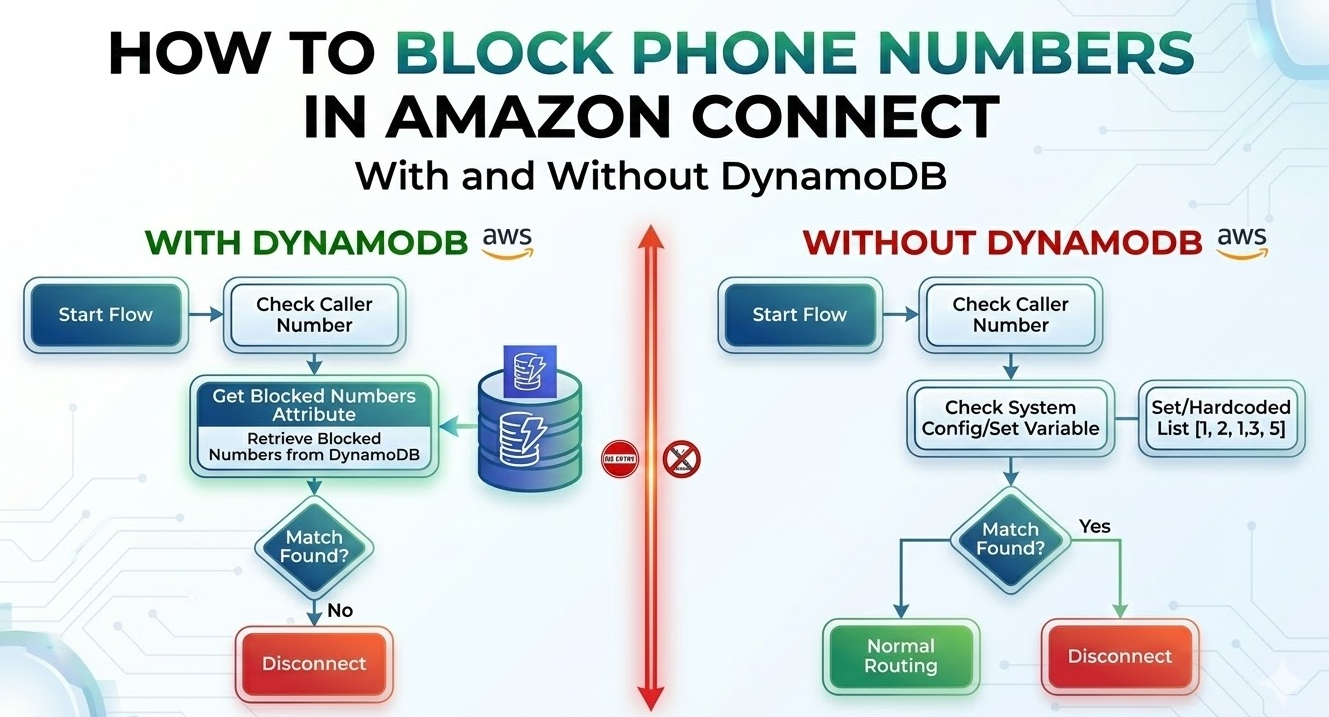
Block phone numbers in amazon connect with Dynamo DB
This is where a serverless call blocking system powered by DynamoDB and AWS Lambda becomes incredibly useful. Instead of manually blocking numbers at the telephony level or relying on static rules, organizations can maintain a dynamic blocklist stored in a DynamoDB table. Whenever a call enters the Amazon Connect contact flow, a Lambda function automatically checks the caller’s number against this database. If the number appears in the blocklist, the system instantly disconnects the call or plays a rejection message.
The beauty of this architecture lies in its simplicity and scalability. Because it uses serverless AWS services, there is no infrastructure to manage. DynamoDB handles data storage with near-instant lookup speeds, Lambda performs the decision logic in milliseconds, and Amazon Connect manages the call flow.
Block phone numbers in amazon connect without Dynamo DB
While DynamoDB-based solutions offer dynamic blocklist management, there’s a simpler approach for smaller-scale implementations that leverages Amazon Connect’s native capabilities. By utilizing Contact Attributes and Contact Flows, you can create an effective call blocking system without introducing additional AWS services or managing external infrastructure.
For companies experiencing repeated nuisance calls, both of the solutions offers a highly automated and cost-effective approach to call filtering. It protects agents, maintains productivity, and keeps support lines available for genuine customers.
Overview of the Amazon Connect Phone Blocking Architecture with Dynamo DB
The Amazon Connect phone number blocking architecture is a clean example of how serverless cloud services can solve a real-world operational challenge. Instead of relying on hardware-based telephony solutions, this architecture uses fully managed AWS services to create a dynamic and scalable call filtering system.
At a high level, the system consists of four major components: Amazon Connect, AWS Lambda, DynamoDB, and CloudWatch. Each plays a specific role in the call blocking process.
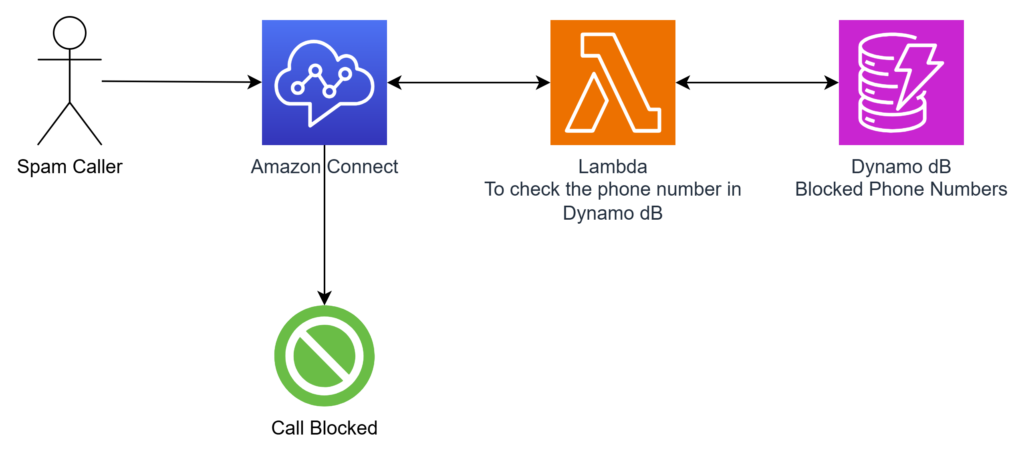
- When a customer places a call to the company’s support number, Amazon Connect acts as the entry point. The contact flow within Connect defines how the call should be processed. Early in the flow, a block invokes a Lambda function to determine whether the caller’s number exists in the blocklist.
- The Lambda function receives the caller’s phone number as input. It then queries a DynamoDB table named something like BlockedPhoneNumbers. If the phone number exists in the table, the function returns a response indicating that the call should be blocked.
- The contact flow evaluates this response and decides what action to take. If the caller is blocked, the system can play a message and disconnect the call immediately. If the number is not blocked, the call continues through the normal routing process toward agents or automated menus.
- CloudWatch provides logging and monitoring capabilities. Every Lambda execution and system event can be tracked through logs, making debugging and analytics much easier.
Step-by-Step Implementation
Step 1: Create the DynamoDB Table
This table will store the phone numbers that must be blocked.
1️⃣ Open DynamoDB
- Login to AWS Console
- Go to DynamoDB
- Click Create Table
2️⃣ Configure Table
Fill the following details:
| Field | Value |
|---|---|
| Table Name | BlockedPhoneNumbers |
| Partition Key | phoneNumber |
| Data Type | String |
| Capacity Mode | On-demand (recommended) |
Click Create Table.
3️⃣ Add a Test Phone Number
Once the table is created:
- Open BlockedPhoneNumbers
- Go to Explore table items
- Click Create Item
Example record:
{
  "phoneNumber": "+911234567890",
  "reason": "Spam Caller",
  "createdAt": "2026-03-07"
}
⚠️ Important
Always store numbers in E.164 format
Example formats:
+14155552671
+919876543210
+447911123456
Step 2: Create the Lambda Function
The Lambda function checks whether the caller number exists in DynamoDB.
1️⃣ Create Lambda
- Go to AWS Lambda
- Click Create Function
- Choose Author from scratch
Fill the details:
| Setting | Value |
|---|---|
| Function Name | CheckBlockedNumber |
| Runtime | Python 3.9+ |
| Architecture | x86_64 |
Click Create Function
2️⃣ Add DynamoDB Permissions
Go to:
Configuration → Permissions
- Click the Lambda Execution Role
- Click Add permissions
- Attach policy:
AmazonDynamoDBReadOnlyAccess
3️⃣ Add Lambda Code
Replace the default code with this:
import json
import boto3
from botocore.exceptions import ClientError
import re

dynamodb = boto3.resource('dynamodb')
table = dynamodb.Table('BlockedPhoneNumbers')

def normalize_phone_number(phone_number):
    """
    Normalize phone number to E.164 format
    """
    # Remove all non-digit characters
    cleaned = re.sub(r'\D', '', phone_number)

    # If number starts with 0 (for local numbers) or doesn't have country code
    # Adjust based on your country code
    if cleaned.startswith('0'):
        cleaned = '91' + cleaned[1:]  # Optional - Replace with your country code, If you are getting any error
    elif len(cleaned) == 10:
        cleaned = '91' + cleaned  # Add country code for 10-digit numbers

    return '+' + cleaned

def lambda_handler(event, context):
    """
    Check if a phone number is blocked in DynamoDB
    """
    print("Received event: " + json.dumps(event))

    try:
        # Extract phone number from Amazon Connect event
        if 'Details' in event and 'ContactData' in event['Details']:
            customer_number = event['Details']['ContactData']['CustomerEndpoint']['Address']
        else:
            customer_number = event.get('phoneNumber', '')

        if not customer_number:
            return {
                'statusCode': 400,
                'isBlocked': False,
                'error': 'No phone number provided'
            }

        # Normalize phone number
        normalized_number = normalize_phone_number(customer_number)
        print(f"Checking number: {normalized_number}")

        # Check DynamoDB for blocked number
        response = table.get_item(
            Key={
                'phoneNumber': normalized_number
            }
        )

        # If item exists, number is blocked
        if 'Item' in response:
            blocked_info = response['Item']
            return {
                'statusCode': 200,
                'isBlocked': True,
                'phoneNumber': normalized_number,
                'blockedReason': blocked_info.get('blockedReason', 'Not specified'),
                'blockedDate': blocked_info.get('blockedDate', 'Unknown'),
                'message': f'Number {normalized_number} is blocked'
            }
        else:
            return {
                'statusCode': 200,
                'isBlocked': False,
                'phoneNumber': normalized_number,
                'message': f'Number {normalized_number} is not blocked'
            }

    except ClientError as e:
        print(f"DynamoDB error: {str(e)}")
        return {
            'statusCode': 500,
            'isBlocked': False,
            'error': f'DynamoDB error: {str(e)}'
        }
    except Exception as e:
        print(f"Unexpected error: {str(e)}")
        return {
            'statusCode': 500,
            'isBlocked': False,
            'error': f'Unexpected error: {str(e)}'
        }
Click Deploy.
4️⃣ Increase Lambda Timeout
Amazon Connect sometimes needs more time.
Go to:
Configuration → General Configuration
Set:
Timeout: 8 seconds
Save.
Step 3: Add Lambda to Amazon Connect
Now we allow Amazon Connect to call the Lambda function.
1️⃣ Open Amazon Connect
- Go to Amazon Connect
- Open your Instance
- Navigate to
Routing → Contact Flows
2️⃣ Add Lambda to Connect
Go to:
Contact Flows → Lambda
Click Add Lambda Function
Select:
CheckBlockedNumber
Save.
Step 4: Modify the Contact Flow
Now we integrate the Lambda check into the call flow.
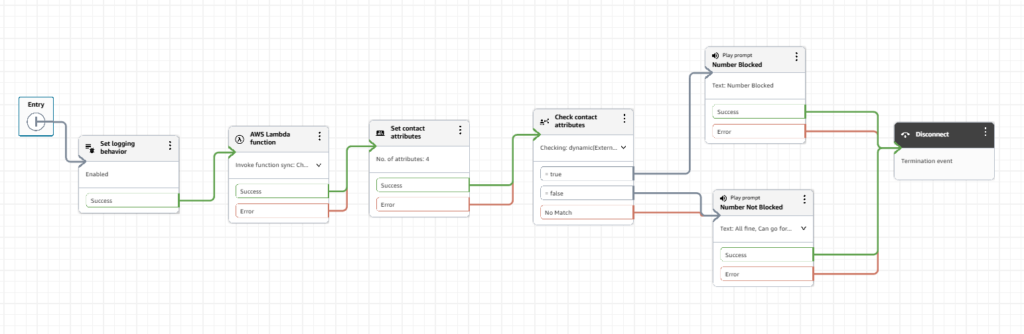
Download the contact flow here
1️⃣ Edit or Create Contact Flow
Open your contact flow.
2️⃣ Add Lambda Block
Drag the block:
Invoke AWS Lambda Function
Configure:
| Field | Value |
|---|---|
| Function | CheckBlockedNumber |
| Timeout | 8 seconds |
3️⃣ Check Lambda Response
Add a Check Contact Attributes block.
Condition:
$.External.isBlocked
Equals
true
Step 5: Configure Call Handling
Now configure what happens if the number is blocked.
If Caller is Blocked
Add blocks:
Play Prompt
Disconnect
Example prompt:
“We are unable to process your call at this time.”
Then disconnect.
If Caller is Allowed
Connect the flow to your normal routing:
Examples:
Transfer to queue
Play menu
Connect to agent
Step 6: Optional – Track Blocked Calls
You can record blocked calls for reporting.
Add Set Contact Attribute Block
After Lambda invocation:
Attribute:
CallBlockReport
Value:
BlockedCall
Create Custom Attribute
Go to:
Amazon Connect → Analytics → Contact Search
Create custom attribute:
CallBlockReport
Now you can filter blocked calls.
Step 7: Test the System
1️⃣ Add a number to DynamoDB
Example:
+911234567890
2️⃣ Call the Amazon Connect number
Call from the blocked number.
Expected behavior:
✔ Message plays
✔ Call disconnects
3️⃣ Test Allowed Call
Call from a number not in DynamoDB.
Expected behavior:
✔ Call continues normally.
Step 8: Monitor Logs
Open:
CloudWatch → Logs → Lambda → CheckBlockedNumber
You can see:
- incoming phone numbers
- DynamoDB responses
- errors
Common Issues & Fixes
| Issue | Fix |
|---|---|
| Lambda timeout | Increase timeout to 8–10 seconds |
| Number not blocked | Ensure number is in E.164 format |
| Lambda not visible in Connect | Add Lambda under Connect permissions |
| DynamoDB access error | Attach DynamoDB policy to Lambda role |
Final Architecture Flow
📞 Caller
⬇
Amazon Connect Contact Flow
⬇
Invoke Lambda
⬇
Lambda checks DynamoDB
⬇
Decision:
Blocked → Play message → Disconnect
Allowed → Continue to Agent
✅ Result
You now have a fully serverless call blocking system that:
- blocks spam callers
- updates instantly via DynamoDB
- requires zero server management
- scales automatically
What makes this architecture particularly powerful is its serverless nature. None of these services require manual server management. AWS automatically handles scaling, fault tolerance, and infrastructure provisioning.
The result is a highly efficient call filtering mechanism that can scale from a few calls per day to thousands per minute without architectural changes.
Overview of the Amazon Connect Phone Blocking Architecture without Dynamo DB
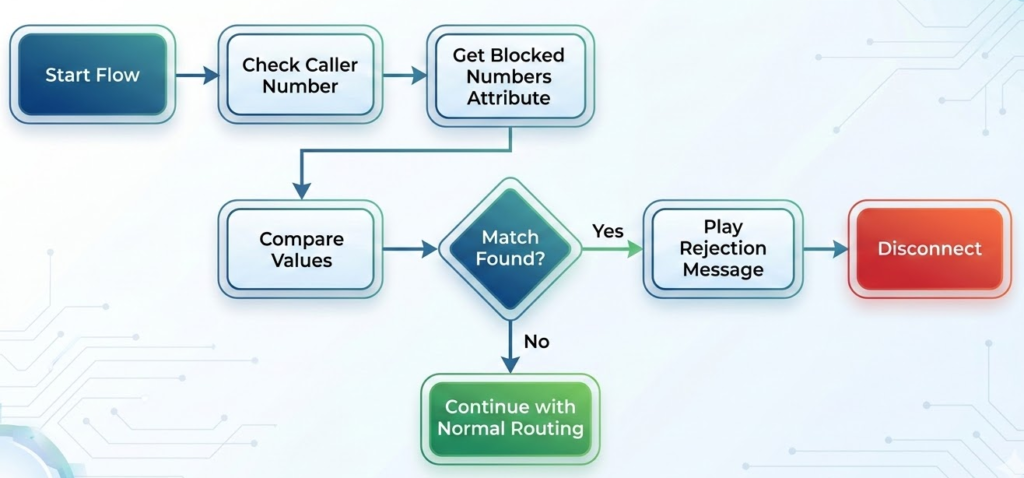
The core concept revolves around storing blocked numbers as contact attributes within your Amazon Connect instance. When a call arrives, the contact flow performs a lookup against these stored attributes and makes a routing decision based on whether the caller’s number matches any blocked entry.
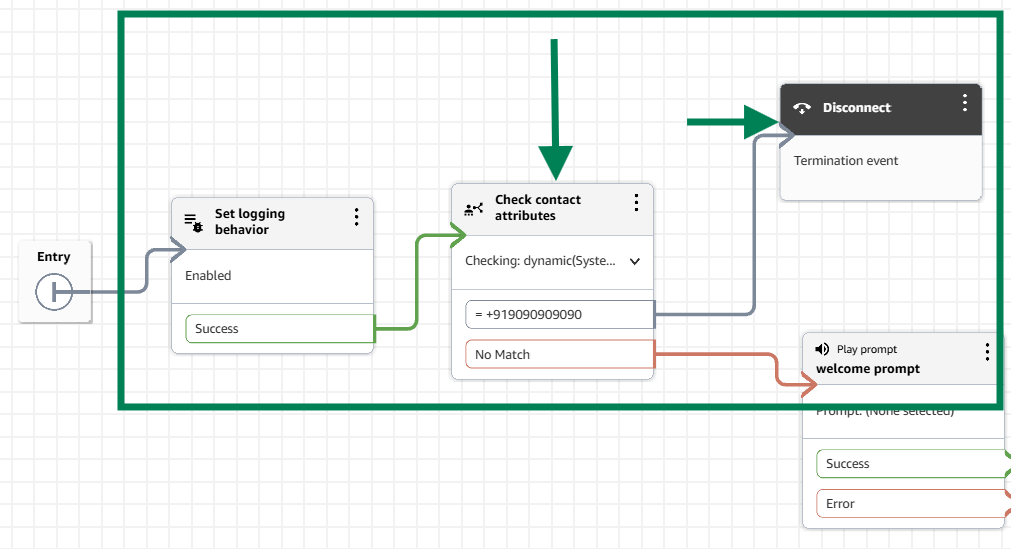
Sample Contact Flow Structure
Implementation Approach
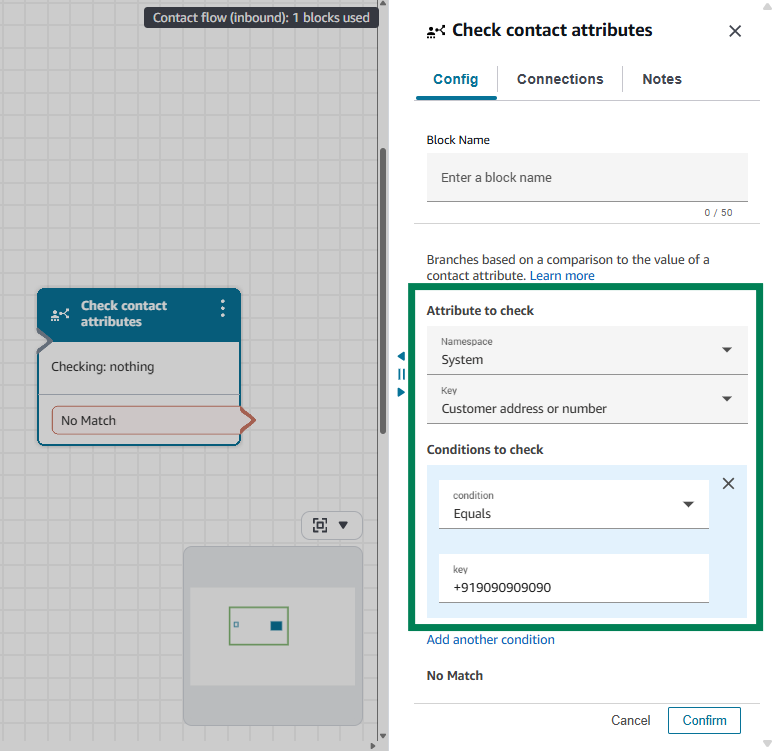
1. Store Blocked Numbers as Contact Attributes
Create a contact attribute that contains a delimited list of blocked phone numbers. This can be a single attribute with comma-separated values or multiple individual attributes depending on your preference.
2. Design the Contact Flow Logic
The contact flow checks the incoming caller number against your blocked numbers list using the “Check Contact Attributes” block. If a match is found, the flow routes to a disconnect prompt or plays a rejection message. If no match exists, the call proceeds normally.
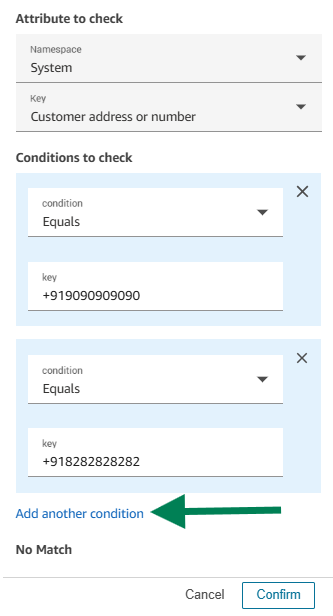
3. Update the Blocklist
When you need to block a new number, simply update the contact attribute value through the Amazon Connect admin console or via the UpdateContactAttributes API.
Benefits of This Approach
- No Additional Services Required – Everything stays within Amazon Connect, reducing complexity and potential failure points
- Simplified Management – Blocklist updates happen directly in the contact flow without involving Lambda functions or database operations
- Lower Latency – Eliminates external API calls, keeping all decision-making within the contact flow
- Cost Effective – No DynamoDB read/write costs or Lambda invocation charges
Limitations to Consider
- Scale Limitations – Contact attributes have size limitations, making this approach suitable for smaller blocklists
- Manual Updates Required – Adding or removing numbers requires direct attribute modification
- No Audit Trail – Unlike DynamoDB, contact attributes don’t maintain change history
- Instance Specific – Blocklists don’t automatically sync across multiple instances
Best Practices
- Format Numbers Consistently – Store all numbers in E.164 format to ensure accurate matching
- Use Descriptive Attribute Names – Name your blocklist attribute clearly, such as “BlockedPhoneNumbers”
- Implement Error Handling – Include logic to handle cases where the attribute might be empty or malformed
- Document Your Blocklist – Maintain external documentation of blocked numbers since contact attributes don’t provide change tracking
This approach works well for organizations with modest blocking needs who want to minimize architectural complexity and keep everything within Amazon Connect’s native capabilities.
Conclusion
Both approaches offer effective call blocking capabilities for Amazon Connect, but serve different operational needs. The DynamoDB-powered solution excels in enterprise scenarios requiring dynamic, large-scale blocklist management with audit capabilities and multi-instance synchronization, making it ideal for organizations handling thousands of blocked numbers across distributed contact centers.
In contrast, the Contact Attributes approach provides a lightweight, serverless alternative perfect for smaller implementations where simplicity trumps scale—it keeps everything native to Amazon Connect, eliminates additional service costs, and offers sub-second decision making entirely within the contact flow.
Ultimately, your choice should align with your operational complexity: choose DynamoDB when you need a scalable, auditable blocking system with minimal manual intervention, and opt for Contact Attributes when you prioritize architectural simplicity, lower latency, and can manage a smaller blocklist through occasional manual updates.