
Amazon Q in Connect for Agent Assist – To implement Amazon Q in Connect for Agent Assist, enable Amazon Q within your Amazon Connect instance, create a domain linked to your knowledge base, configure AWS KMS encryption, integrate data sources like Salesforce or Zendesk, grant agent permissions, and test real-time AI recommendations for responses and next-best actions.
What is Amazon Q?
Imagine having a super-smart assistant sitting next to every customer service agent—one that listens, understands, and instantly suggests the perfect response. That’s essentially what Amazon Q brings to the table. It’s a generative AI-powered assistant designed specifically for business environments, particularly customer service operations.
Within Amazon Connect, this AI assistant acts like a real-time co-pilot. It analyzes conversations, pulls relevant information from knowledge bases, and recommends the best possible responses. According to AWS, it helps agents solve customer issues faster by delivering contextual answers and recommended actions in real time.
Before Amazon Q, there was Amazon Connect Wisdom—a tool that centralized knowledge and helped agents find answers faster. While useful, Wisdom was still limited by traditional machine learning capabilities.
Core Features of Amazon Q in Connect for Agent Assist
Generative AI Recommendations
At the heart of Amazon Q is its ability to generate responses dynamically. It doesn’t just fetch answers—it builds them based on context. This means agents get suggestions tailored to each specific conversation.
Knowledge Base Integration
Amazon Q can connect with multiple data sources, including:
- Internal documentation
- CRM systems
- Cloud storage like Amazon S3
- Third-party tools
It supports ingestion of formats like PDFs, DOCX, HTML, and text files, making it highly flexible for enterprise environments.
Conversation Summarization
After a call or chat, Amazon Q can automatically generate summaries. This eliminates the need for manual note-taking and ensures accurate documentation for future reference.
Also Check – Fixing ‘No Audio’ in Amazon Connect: The Ultimate Amazon Connect WebRTC error 503 Citrix fix (2026 Update)
Prerequisites Before Implementation
Required AWS Services
Before implementing Amazon Q in Connect for Agent Assist, you’ll need:
- Amazon Connect instance
- Amazon Q access enabled
- Optional: Contact Lens for real-time voice recommendations
Licensing and Cost Considerations
Amazon Q was initially offered in preview, but pricing models have evolved. Typically, organizations can expect a per-agent monthly cost, similar to other AI copilots in the market.
The investment might seem significant at first—but when you consider productivity gains and reduced handling time, the ROI becomes clear.
Step-by-Step Guide to Implement Amazon Q in Connect for Agent Assist
Step 1: Create a Domain
The first step is setting up a domain, which acts as the foundation of your AI assistant. This domain connects your knowledge base with Amazon Q.
You can create multiple domains, but each operates independently. This allows businesses to segment data based on departments or use cases.
- Open the Amazon Connect console at https://console.aws.amazon.com/connect/.
- The Amazon Connect virtual contact center instances page, the instance alias.
- In the navigation pane, choose AI Agents, and then choose Add domain.
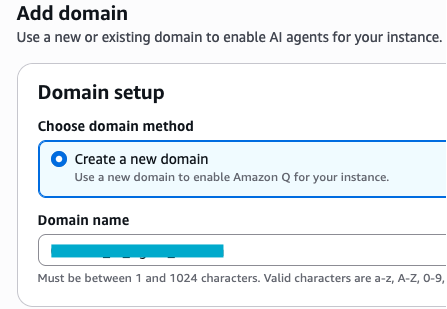
- On the Add domain page, choose Create a domain.
- In the Domain name box, enter a friendly name, such as your organization name.
- Add domain page, create a new domain option.
- Keep the page open and go to the next step.
Step 2: Configure Encryption with AWS KMS
Security is critical. Amazon Q allows you to encrypt data using AWS Key Management Service (KMS).
You can:
- Use default AWS keys
- Under Encryption, uncheck (clear) the Customize encryption settings checkbox.
- Select Add domain.
- Create custom keys for enhanced control
- Under Encryption, open the AWS KMS key list and select the desired key.
- Select Add domain.
To use an existing key with Amazon Connect chats, tasks, and emails, you must grant the connect.amazonaws.com service principal the kms:Decrypt, kms:GenerateDataKey*, and kms:DescribeKey permissions.
This ensures that sensitive customer data remains protected at all times.
Example Policy
{
    "Id": "kms-key-console-policy",
    "Version":"2012-10-17",
    "Statement": [
        {
            "Effect": "Allow",
            "Principal": {
                "AWS": "arn:aws:iam::999999999922222:root"
            },
            "Action": "kms:*",
            "Resource": "*"
        },
        {
            "Effect": "Allow",
            "Principal": {
                "Service": "connect.amazonaws.com"
            },
            "Action": [
                "kms:Decrypt",
                "kms:GenerateDataKey*",
                "kms:DescribeKey"
            ],
            "Resource": "*"
        }
    ]
}
Check KloudMint Tool – AWS Policy Generator
Step 3: Add Data Integrations
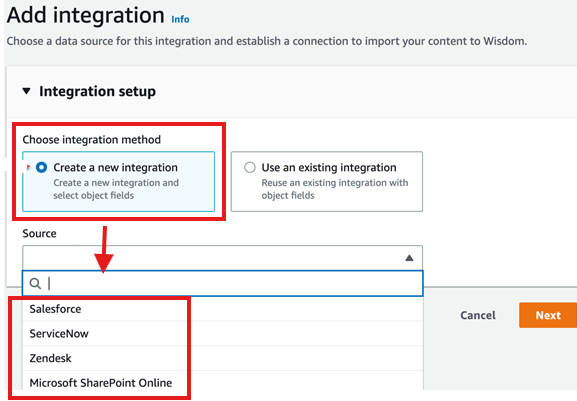
Next, connect your data sources. Amazon Q supports integrations with platforms like Salesforce, Zendesk, and ServiceNow.
You can also:
- Define sync frequency (hourly, daily, etc.)
- Set ingestion start dates
This ensures your AI assistant always has the latest information.
Step 4: Configure Agent Access
Agents need access to Amazon Q within their workspace. This is done by enabling permissions in the Amazon Connect console.
- Insert a Connect Assistant block into your contact flow. This block links a specific Connect AI agents domain to the active interaction, allowing agents to access relevant information tailored to the contact based on defined conditions.
- If you prefer a more customized setup, create an AWS Lambda function and integrate it into your flow using the Lambda function block. This approach gives you greater flexibility to control how data is processed and presented.
- To enable Connect AI agents for voice calls, make sure Contact Lens conversational analytics is activated. You can do this by adding a Set recording and analytics behavior block configured for real-time Contact Lens analytics. The placement of this block within the flow does not affect its functionality.
Once configured, agents can:
- Use natural language queries
- Receive real-time suggestions
- Access knowledge instantly
Step 5: Test and Optimize
After setup, testing is crucial. Encourage agents to experiment with queries and validate responses.
Optimization involves:
- Updating knowledge bases
- Refining prompts
- Monitoring performance
Also Check – Stopping the Amazon Connect AI Agent Infinite Reasoning Loop
Integration with Third-Party Tools
Salesforce, Zendesk, and ServiceNow
Amazon Q shines when integrated with existing tools. It can pull customer data, case history, and support documentation from platforms like Salesforce and Zendesk.
This creates a unified view of the customer, enabling more personalized interactions.
Real-Time Agent Assist Capabilities
Suggested Responses
Amazon Q listens to conversations and suggests responses instantly. These suggestions are context-aware and tailored to each situation.
Next-Best Action Guidance
Beyond answers, Amazon Q recommends what to do next—whether it’s escalating a case, offering a discount, or guiding a customer through a process.
AI Guardrails and Data Security
Preventing Hallucinations
One concern with generative AI is inaccurate responses. Amazon Q addresses this with built-in guardrails that limit incorrect outputs and ensure responses stay within company guidelines.
Protecting Sensitive Data
Guardrails also help:
- Redact sensitive information
- Prevent exposure of personal data
- Maintain compliance with regulations
Best Practices for Implementation
Knowledge Base Optimization
Your AI is only as good as your data. Keep your knowledge base:
- Updated regularly
- Structured clearly
- Free of outdated content
Training Agents Effectively
Even with AI, human training matters. Teach agents how to:
- Use suggestions effectively
- Verify AI responses
- Provide feedback for improvement
Check KloudMint Tool – S3 Regional Namespace Generator & Validator
Common Challenges and Solutions in Amazon Q in Connect for Agent Assist
Implementing Amazon Q isn’t without hurdles. Some common challenges include:
| Challenge | Solution |
|---|---|
| Inaccurate responses | Improve data quality |
| Integration complexity | Start with fewer tools |
| Agent resistance | Provide training and incentives |
Future of Amazon Q in Contact Centers
Amazon Q is evolving rapidly. New updates include:
- Self-service capabilities for customers
- AI-driven automation across channels
- Enhanced personalization
In fact, Amazon has already expanded Q to support customer self-service via voice and digital channels, enabling businesses to automate complex interactions.
The future points toward fully autonomous contact centers where AI handles routine tasks while humans focus on complex issues.
Conclusion of Amazon Q in Connect for Agent Assist
Amazon Q in Connect isn’t just another AI tool—it’s a transformative shift in how contact centers operate. By combining generative AI with real-time data and enterprise knowledge, it empowers agents to deliver faster, smarter, and more personalized customer experiences.
From reducing handling time to improving customer satisfaction, the benefits are hard to ignore. And as AI continues to evolve, tools like Amazon Q will only become more powerful and essential.
If you’re looking to modernize your contact center, now is the perfect time to explore what Amazon Q can do.
FAQs about Amazon Q in Connect for Agent Assist
1. Is Amazon Q in Connect available globally?
Amazon Q is expanding across AWS regions, but some advanced features may still be limited to specific locations.
2. Do I need Contact Lens to use Amazon Q?
Contact Lens is required for real-time voice recommendations but not for chat-based interactions.
3. Can Amazon Q integrate with CRM systems?
Yes, it supports integrations with platforms like Salesforce, Zendesk, and ServiceNow.
4. How secure is Amazon Q?
It includes encryption via AWS KMS and built-in guardrails to protect sensitive data.
5. Does Amazon Q replace human agents?
No, it enhances agent capabilities by acting as a real-time assistant, not a replacement.