

Amazon Connect persistent chat lets a customer close a chat window and pick the conversation back up later — with the agent seeing everything that came before. Done right, it removes the “let me pull up your account again” friction that makes repeat contacts miserable. Done wrong, it silently drops history, breaks transcript retrieval, or hands the customer a brand-new chat with no memory of the last one.
This guide walks through how Amazon Connect persistent chat actually works under the hood — chat rehydration, SourceContactId, RehydrationType, RelatedContactId, and ContinuedFromContactId — and then gives you a step-by-step implementation path using both the StartChatContact API and the Create persistent contact association flow block, plus the architecture, troubleshooting, and production practices you’ll need once this is live.
What Is Persistent Chat in Amazon Connect?
Persistent chat is the Amazon Connect feature that lets customers resume a previous chat with the same context, metadata, and transcript history carried forward, instead of starting from zero. Customers don’t have to re-explain their issue, and agents get the full conversation history — not just the current session.
The mechanism behind this is called chat rehydration: Amazon Connect retrieves transcripts from one or more previous, ended chat contacts and surfaces them inside a new chat session. Rehydration only works against contacts that have fully ended, because transcript generation happens asynchronously after a chat closes — in practice, you should expect to wait roughly 30–60 seconds after a chat ends before it’s reliably available to rehydrate from.
Persistent chat is not something Amazon Connect does automatically for a returning customer. Nothing in the service watches for “this looks like the same person” and stitches chats together on its own. You have to tell Amazon Connect which previous contact to rehydrate from, every time. That’s the part most implementations get wrong, and it’s the reason the rest of this guide spends so much time on contact-ID storage and retrieval rather than just the API call itself.
How Amazon Connect Persistent Chat Works
Chat Rehydration
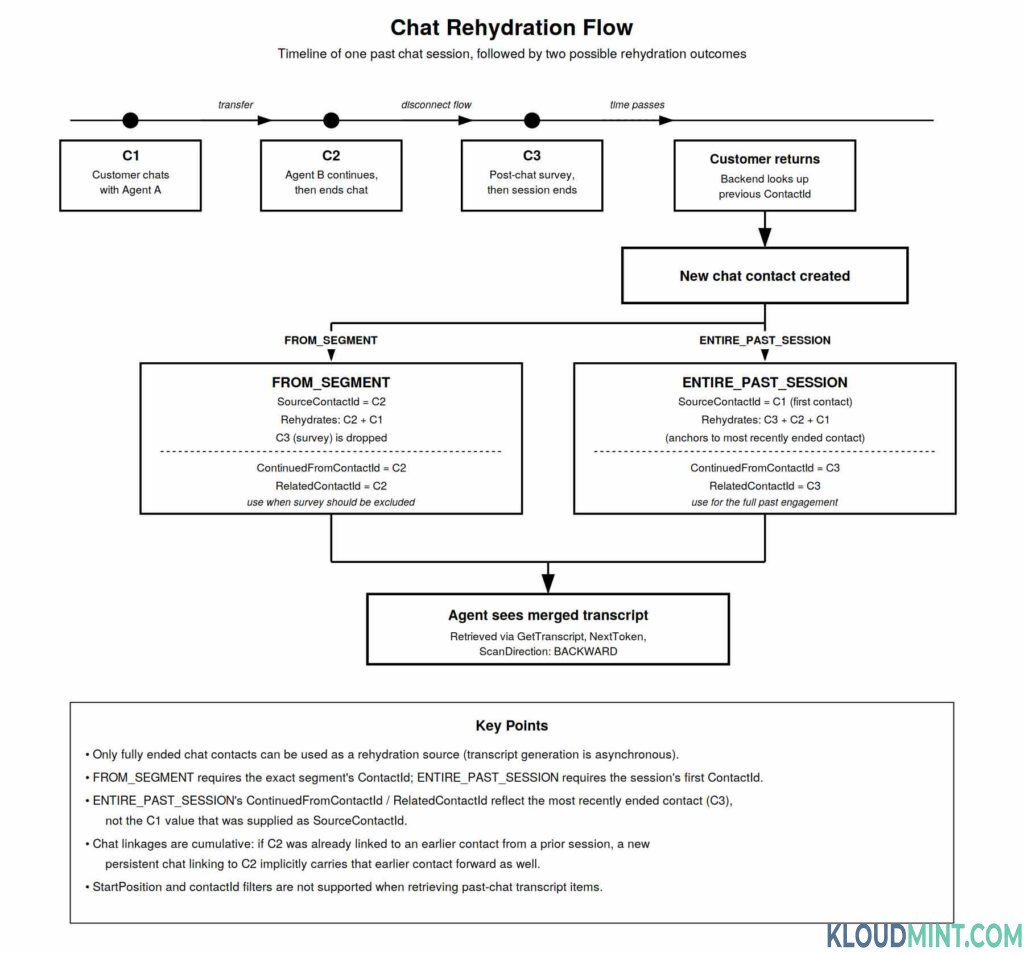
Rehydration is the process, not the feature name customers see — but it’s the concept you need to reason about when debugging. When a new chat contact is created with a link back to a previous contact, Amazon Connect pulls the transcript(s) associated with that link and makes them retrievable through the chat transcript API, in addition to whatever new messages are sent in the current session.
Two rehydration modes control how much history comes back, and which contact anchors that history.
SourceContactId
SourceContactId is the field where you tell Amazon Connect which previous contact to rehydrate from. It’s a required input, not something Connect infers — Amazon Connect has no built-in customer-identity resolution for chat, so it has no way to know, on its own, that the person starting a new chat is the same person who chatted last Tuesday. Your application has to supply that link.
Practically, this means:
- Your application needs a way to identify the returning customer (authenticated session, email/phone lookup, a widget-persisted identifier, CRM record — whatever your identity model already uses).
- Once identified, your application needs to look up that customer’s most relevant previous
contactId. - That
contactIdbecomes theSourceContactIdyou pass to Amazon Connect, either via theStartChatContactAPI or the flow block.
Where the ID comes from is up to your architecture — commonly a small repository (DynamoDB is a typical choice, but not a requirement) fed by chat message streaming or by a Lambda function reacting to contact events. The one hard requirement is that at the moment you create the new chat, you can retrieve some previous contactId for that customer.
RelatedContactId
RelatedContactId is how the association shows up on the contact record itself. When a new contact is linked to an existing one, the new contact carries a copy of certain contact properties from the related contact, and RelatedContactId is the field that records which contact it was linked to. For persistent chat specifically, RelatedContactId is the contactId that was actually used to source the rehydration — which, as you’ll see below, isn’t always the exact SourceContactId you passed in.
ContinuedFromContactId
ContinuedFromContactId is returned in the StartChatContact API response and tells you which past contact the new persistent chat session was actually continued from. It’s also surfaced as RelatedContactId in the contact record. In straightforward cases ContinuedFromContactId matches the SourceContactId you supplied. With ENTIRE_PAST_SESSION, it usually won’t — because Connect resolves it to the most recently ended contact in that chat session, not the first one you specified. That distinction trips people up constantly, and it’s worth internalizing now rather than debugging it later.
| Field | What it represents | Where you see it |
|---|---|---|
ContactId | The identifier of a specific contact (chat segment) in Amazon Connect. | Contact records, API responses |
SourceContactId | The previous contact you specify as the anchor for rehydration. | StartChatContact request (PersistentChat object) or the flow block’s user-defined attribute |
RelatedContactId | The contact that was actually used to source rehydration, recorded on the new contact. | Contact Trace Record (CTR) / contact record |
ContinuedFromContactId | Confirms which past contact the new session was continued from. | StartChatContact API response |
ENTIRE_PAST_SESSION vs FROM_SEGMENT
Both modes start a new chat session and pull transcript history into it. They differ in scope and in which contact you’re expected to pass as SourceContactId.
FROM_SEGMENTrehydrates starting from a specific past chat segment you name. You supply that segment’scontactIdasSourceContactId. History from contacts that came before that segment (in the same linked chain) is included; anything that happened after the segment you named is not.ENTIRE_PAST_SESSIONrehydrates the full past session. Here you’re expected to supply the firstcontactIdof the past chat session asSourceContactId— but Amazon Connect resolves the actual rehydration point to the most recently ended contact in that session, and pulls in every segment along the way.
ENTIRE_PAST_SESSION | FROM_SEGMENT | |
|---|---|---|
What you pass as SourceContactId | The first contactId of the past session | The specific past contactId you want to resume from |
| What Connect actually rehydrates from | The most recently ended contact in that session | The exact contact you specified |
| Transcript scope | Every segment in the past session | The specified segment plus everything before it in the chain |
| Typical use case | Customer wants the full history, including things like transfers and post-chat surveys | Customer (or your business logic) should resume from a particular point, deliberately excluding later segments |
ContinuedFromContactId in the response | The most recent ended contact, not necessarily the one you passed | Matches the SourceContactId you passed |
A Concrete Example
Take a session where:
- C1 — customer chats with Agent A, then gets transferred.
- C2 — Agent B continues the conversation and ends the chat.
- C3 — the disconnect flow routes the customer into a post-chat survey, which creates its own contact and then ends.
The customer comes back later wanting to continue. Two outcomes are possible from the same three-contact history:
Use case: skip the survey, resume where the human conversation left off. Set SourceContactId = C2 and RehydrationType = FROM_SEGMENT. The new session rehydrates C2 and C1 — C3 (the survey) is dropped. ContinuedFromContactId and RelatedContactId both come back as C2.
Use case: show the full past engagement, survey included. Set SourceContactId = C1 (the first contact) and RehydrationType = ENTIRE_PAST_SESSION. Amazon Connect actually starts the rehydration from C3 (the most recently ended contact), and pulls in C3, C2, and C1. ContinuedFromContactId and RelatedContactId both come back as C3, not C1 — even though C1 is what you supplied.
One more wrinkle worth planning for: chat linkages are cumulative. If a past contact (say C2) was itself linked to a contact from an earlier, separate chat session (C1 from a different day, for example), then linking to C2 in a new persistent chat implicitly pulls C1 along too, producing a chain like C3 → C2 → C1. Long-lived customer relationships can accumulate fairly deep chains this way, which matters for both transcript volume and for how you design your contact-ID repository (you generally want to store the most recent endpoint of the chain, not try to track every historical link yourself).
Also Check – How to Setup Realtime Auto Amazon Connect Chat Translation (Step-by-Step Guide)
Architecture for Amazon Connect Persistent Chat
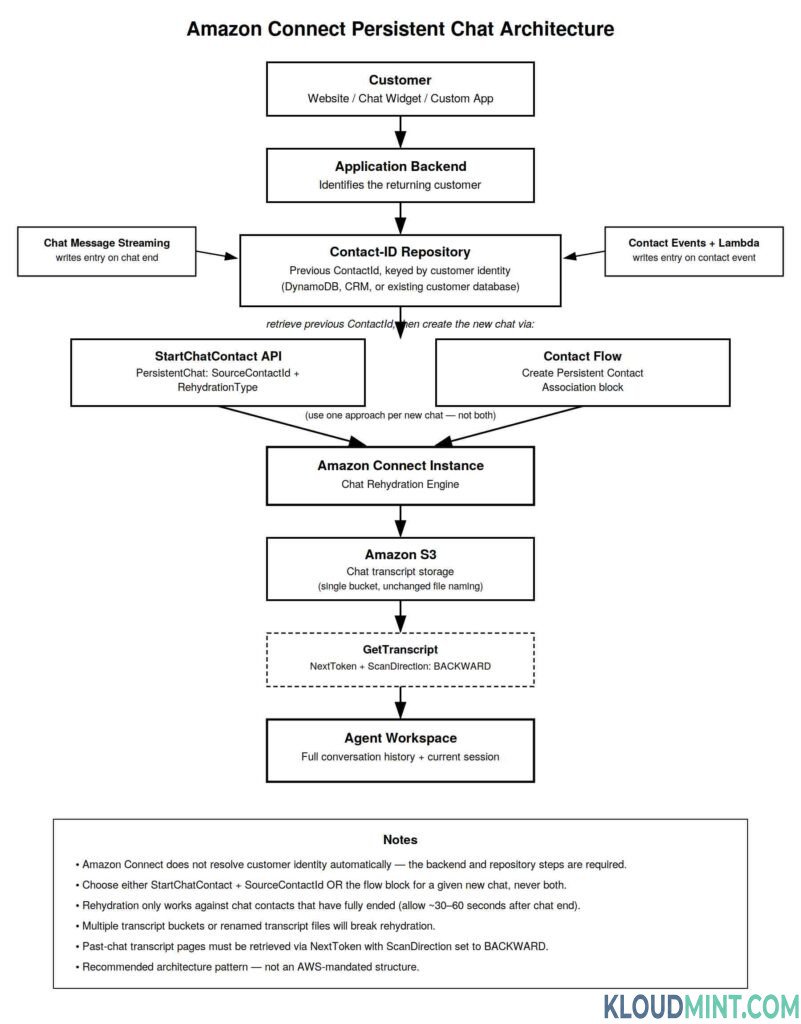
Persistent chat isn’t a single API call you bolt on — it depends on three things being true at the same time:
- You can identify the returning customer.
- You can retrieve a
contactIdto use asSourceContactIdfor that customer. - Amazon Connect can retrieve the past transcript from S3 without interference.
A reasonable production shape looks like this:
Customer
   ↓
Website / Chat Widget
   ↓
Application Backend (identity resolution)
   ↓
Persistent Chat Repository  (previous ContactId, keyed by customer identity)
   ↓
Amazon Connect StartChatContact  — OR —  Contact Flow (Create persistent contact association)
   ↓
Chat Rehydration
   ↓
Agent Workspace (full transcript history)
This is a recommended pattern, not something AWS mandates structurally — but the pieces are all things AWS documentation explicitly calls out as your responsibility: a repository for contact-record data, a way to populate it, and a way to retrieve from it before you create the new chat.
How you populate the repository: AWS documentation describes two supported approaches — enabling [chat message streaming] and writing an entry when a chat ends, or inspecting contact events and using a Lambda function to write entries as chats complete. Either approach gets you the same outcome: a lookup table keyed on customer identity, storing at least the most recent contactId for that customer’s chat history.
Where to store the previous contact ID: DynamoDB is a common, low-latency choice for this lookup because it fits the “get one previous contact ID by customer key” access pattern well, but it isn’t the only valid option. An existing customer database, a CRM, a customer profile store, or any backend data store you already operate can work — the architectural requirement is retrieval speed and reliability at the moment a new chat is created, not the specific storage engine.
How to Set Up Persistent Chat in Amazon Connect
Step 1 — Confirm Amazon Connect Prerequisites
You need a working Amazon Connect instance with chat enabled, and a chat channel already in production (chat widget, custom application via ChatJS, Apple Messages for Business, or another supported chat surface). Persistent chat is additive to an existing chat implementation — it isn’t a standalone feature you turn on in isolation.
Step 2 — Configure Chat and Transcript Storage
Amazon Connect stores chat transcripts in an S3 bucket associated with your instance. Persistent chat depends entirely on being able to retrieve those transcripts later, so before building anything else, confirm your instance is using a single, consistent transcript bucket. Two specific things will silently break rehydration:
- Using multiple chat transcript buckets across your instance or over time.
- Changing the transcript file naming convention that Amazon Connect generates.
Neither of these throws an obvious error at rehydration time — they just mean the past transcript can’t be found. Treat your transcript bucket configuration as something that, once set, should not change.
Step 3 — Decide How the Previous Contact ID Will Be Stored
Pick your repository pattern before you write any rehydration code. At minimum, decide: what’s the customer identity key (authenticated user ID, phone number, email, widget-issued token), and what’s the write path (chat message streaming vs. contact-events Lambda) that keeps the repository current as chats end.
Step 4 — Retrieve the Previous Contact ID
Conceptually, your backend does this at the moment a customer opens a new chat:
python
# Illustrative — not a deployable snippet
def get_previous_contact_id(customer_identity):
    record = repository.get(customer_identity)
    if record and record.get("last_contact_id"):
        return record["last_contact_id"]
    return None
If no previous contact ID is found, you simply start a normal chat — persistent chat is opt-in per new chat, not a fallback that fails loudly.
Step 5 — Start the New Chat
If you’re driving chat creation from your own backend (rather than the Amazon Connect chat widget or Apple Messages for Business), enable persistence directly on StartChatContact using the PersistentChat object:
json
PUT /contact/chat HTTP/1.1
Content-type: application/json
{
  "InstanceId": "string",
  "ContactFlowId": "string",
  "Attributes": { "string": "string" },
  "InitialMessage": {
    "Content": "string",
    "ContentType": "string"
  },
  "PersistentChat": {
    "SourceContactId": "2222222-aaaa-bbbb-2222-222222222222222",
    "RehydrationType": "FROM_SEGMENT"
  }
}
Use either this approach or the flow block below for a given new chat — AWS documentation is explicit that you can only enable persistence of a SourceContactId on a new chat once. Combining both for the same chat isn’t a supported configuration.
Step 6 — Configure the Flow Block (If Not Using the API Directly)
For chat surfaces where you don’t control the StartChatContact call directly — notably the Amazon Connect chat widget and Apple Messages for Business — use the Create persistent contact association flow block instead. AWS specifically recommends the flow block for these two integrations.
- After the chat contact is created, drop the Create persistent contact association block into the flow.
- Set a user-defined attribute that supplies the source contact ID (retrieved earlier by your backend and passed into the flow as a contact attribute).
- Select the rehydration mode on the block.
- Wire the Success branch to continue into your normal chat flow (queueing, routing to an agent, etc.).
- Wire the Error branch to a sensible fallback — typically just continuing the chat without history rather than failing the contact outright.
The block only routes chat contacts successfully — voice and task contacts hit the Error branch automatically, since the feature doesn’t apply to those channels. It’s supported across most flow types you’d realistically use it in: inbound flows, customer queue/hold/whisper flows, outbound whisper, agent hold/whisper, and transfer-to-agent/queue flows.
Alternatively, you can call the CreatePersistentContactAssociation API directly from a Lambda function invoked in the flow, which achieves the same result as the block for teams that prefer to keep logic in code rather than flow configuration.
Step 7 — Choose the Rehydration Type
Use the table from the earlier section as your decision guide: pick FROM_SEGMENT when you want a specific, bounded slice of history (e.g., excluding a post-chat survey), and ENTIRE_PAST_SESSION when the customer or your business rules call for the complete past engagement. Remember that ENTIRE_PAST_SESSION expects the first contact ID of the past session as input, not the last.
Step 8 — Test Chat Rehydration
Run an end-to-end test: complete a chat, wait at least 30–60 seconds for transcript generation to finish, then start a new chat with the ended contact’s ID as SourceContactId. Confirm the past transcript is retrievable in the new session (see the transcript retrieval section below) before you consider the integration done.
Step 9 — Validate the Agent Experience
Confirm the agent-side interface actually surfaces the rehydrated transcript, not just that the API returns it. Depending on your agent application, this may require your CCP/agent UI to explicitly fetch and render the paginated past-chat history rather than assuming it appears automatically.
Step 10 — Validate Contact Records and Linkage
Pull the contact record for the new chat and confirm RelatedContactId matches what you expect for the rehydration mode you chose, and that ContinuedFromContactId in the StartChatContact response lines up. This is the fastest way to catch a mode/ID mismatch before it reaches customers.
Also Check – How to Implement Amazon Q in Connect for Agent Assist: Step-by-Step Guide
Implementing Persistent Chat with StartChatContact
This is the right approach when your own backend or application creates the chat contact — for example, a custom web or mobile chat client built on ChatJS, where you already control the StartChatContact call.
javascript
// Illustrative backend call — not a deployable snippet
const response = await connectParticipant.startChatContact({
  InstanceId: instanceId,
  ContactFlowId: contactFlowId,
  ParticipantDetails: { DisplayName: customerName },
  InitialMessage: { ContentType: "text/plain", Content: "Hi, I'm back." },
  PersistentChat: {
    SourceContactId: previousContactId, // retrieved from your repository
    RehydrationType: "FROM_SEGMENT"
  }
});
The previousContactId has to come from somewhere your application controls — it will not be supplied by Amazon Connect. This is the approach to recommend for architectures where the chat entry point is a custom application rather than the AWS-hosted widget.
Implementing Persistent Chat with the Flow Block
This is the right approach when the entry point is the Amazon Connect chat widget or Apple Messages for Business, where you don’t directly control the initial StartChatContact payload. The flow block lets you inject the source contact ID as a flow attribute after the contact has already been created, and lets non-developers manage rehydration configuration inside the flow designer rather than in application code.
| Approach | Best for | Where configured | Key consideration |
|---|---|---|---|
StartChatContact + SourceContactId | Custom application/backend-driven chat creation | API / application code | Previous contact ID must already be known before the call |
| Create persistent contact association block | Chat widget, Apple Messages for Business, other flow-first integrations | Amazon Connect flow | Source contact ID must be supplied as a user-defined attribute; only chat contacts are supported |
If your organization runs both a custom app and the hosted widget, expect to implement both approaches side by side — just never combine them for the same chat contact.
Using Amazon Connect ChatJS with Persistent Chat
ChatJS is the browser-based client library that handles the chat session itself — sending and receiving messages, managing connection state, and exposing chat events to your frontend. It does not need any code changes to support persistent chat, because rehydration is decided before the chat session starts, not by anything ChatJS does at runtime.
Concretely:
- The frontend’s job is largely unchanged: initialize the chat session with the participant token/details returned once the chat contact has been created.
- The backend’s job is where persistent chat actually lives: identify the customer, look up their previous
contactId, and include it in theStartChatContactcall before ChatJS ever gets involved. - Rehydration’s effect on the UX shows up when your frontend fetches transcript history — the past messages become available through the same transcript-retrieval mechanism as any other chat history, just with older messages behind pagination (see below).
Do not assume ChatJS resolves customer identity or contact-ID persistence for you — that logic belongs entirely to your backend and repository layer. ChatJS’s role stops at rendering the chat session Amazon Connect gives it.
How to Retrieve Previous Chat Transcripts
Past-chat transcript retrieval uses the same GetTranscript API and NextToken pagination model as normal chat, with a couple of persistent-chat-specific behaviors:
- The initial
GetTranscriptcall on a newly started persistent chat session returns aNextTokenif past messages exist. - To actually pull those past messages, call
GetTranscriptagain using thatNextToken, and setScanDirectiontoBACKWARD. - If there’s more history than fits in one page, the response includes another
NextToken, and you repeat the process to page further back. StartPositionandcontactIdfilters are not supported for transcript items that belong to the past chat portion of a persistent session — plan your retrieval logic aroundNextToken/ScanDirectiononly, not around filtering by a specific historicalcontactId.
javascript
// Illustrative pseudocode — not a deployable snippet
let transcript = await getTranscript({ ContactId, ConnectionToken });

while (transcript.NextToken) {
  const pastPage = await getTranscript({
    ContactId,
    ConnectionToken,
    NextToken: transcript.NextToken,
    ScanDirection: "BACKWARD"
  });
  mergeIntoHistory(pastPage.Transcript);
  transcript = pastPage;
}
Why this matters: unlike retrieving the current session’s live messages, past-chat retrieval is inherently a backward-paging operation. Building your agent UI to fetch a single page and assume that’s the whole history is the single most common reason teams report “the rehydration API worked but the agent can’t see the old messages.”
Persistent Chat vs Persistent Connection in Amazon Connect
These two features share the word “persistent” and nothing else. Confusing them is common enough to call out explicitly.
| Feature | Persistent Chat | Persistent Connection |
|---|---|---|
| Purpose | Resume previous chat conversations with context and transcript carried forward | Keep an agent’s softphone media connection warm between calls so the next call connects faster |
| Applies to chat? | Yes | No — explicitly does not apply to chat or task |
| Applies to voice? | Not the same feature | Yes |
| Main concept | Chat rehydration | Softphone media connection reuse |
| Historical transcript | Yes | No |
| Customer conversation continuity | Yes | No — this is an agent-side call-setup optimization, not a customer-facing history feature |
| Configured where | StartChatContact API or a contact flow block | Per-agent softphone setting under Users → Edit user |
| Browser support note | N/A | Supported on Chrome and Edge; not supported on Firefox |
If you searched for “persistent chat” while actually troubleshooting slow call connect times for agents, you want Persistent Connection, not this article’s subject.
Amazon Connect Persistent Chat Troubleshooting
Problem 1: Previous transcript does not appear
Check, in roughly this order:
- Is the
SourceContactIdactually the contact you think it is — and, forENTIRE_PAST_SESSION, is it the first contact of the past session (not the last)? - Is the rehydration type correct for the outcome you expected?
- Has enough time passed since the source contact ended? Transcript generation is asynchronous; rehydrating immediately after a chat ends is a common false failure.
- Was the source chat session fully ended, or still technically active?
- Has the S3 transcript bucket configuration changed, or are there multiple transcript buckets in play?
- Was the Connect-generated transcript file name altered by any downstream process?
- Is the contact linkage what you expect — check
RelatedContactIdon the new contact’s record.
Problem 2: Rehydration fails outright
- Confirm the source contact ID exists and belongs to the same Amazon Connect instance.
- Confirm the source contact has actually ended (rehydration is not supported against active contacts).
- If using the flow block, confirm the block’s Success and Error branches are wired correctly, and check what the Error branch is telling you.
- Confirm the block is only being hit on chat contacts — voice and task will always route to Error by design.
- If using the API, double-check the
PersistentChatobject structure in theStartChatContactrequest.
Problem 3: Customer gets a brand-new chat with no history
- Most often, this is a repository miss: your backend failed to retrieve a previous
contactIdfor this customer, so noSourceContactIdwas ever supplied — Amazon Connect will happily start a normal chat in that case, with no error. - Confirm customer identity mapping is resolving to the correct record — a mismatched identity key (e.g., a new session token instead of a persistent customer identifier) will silently miss the lookup.
- Confirm the stored contact ID is actually the correct, most recent one for that customer, not a stale or mistargeted value.
- Confirm you selected the rehydration mode that matches the ID you’re passing (a
FROM_SEGMENT-style ID passed withENTIRE_PAST_SESSIONsemantics, or vice versa, can produce unexpected scope).
Problem 4: Only part of the conversation appears
This is almost always expected behavior from FROM_SEGMENT, not a bug — it deliberately rehydrates only the specified segment and what came before it in the chain, dropping anything after. If the customer needs the full history including later segments like a post-chat survey, you want ENTIRE_PAST_SESSION with the session’s first contact ID instead.
Problem 5: Transcript retrieval returns unexpected results
- Confirm you’re paginating correctly with
NextTokenand settingScanDirectiontoBACKWARDon the follow-up call for past messages. - Confirm you’re not attempting to use
StartPositionor acontactIdfilter against past-chat transcript items — that combination isn’t supported. - If you only fetch one page, you will only see one page’s worth of history — deep chat linkages can require multiple backward pages.
| Symptom | Likely cause |
|---|---|
| No past transcript at all | Wrong SourceContactId, source contact not yet ended, or S3/transcript configuration drift |
| Rehydration errors in the flow | Non-chat channel hitting the block, or malformed source contact ID/branch wiring |
| New chat has no history | Repository lookup failed or returned nothing — no SourceContactId was ever set |
| History stops earlier than expected | FROM_SEGMENT scope, working as designed |
| Transcript API returns partial history | Missing NextToken/ScanDirection pagination logic |
Production Best Practices
- Customer identity mapping is the load-bearing part of this whole feature — invest in getting it right before optimizing anything else.
- Contact ID persistence should write on every chat end, not just periodically — a stale previous-contact pointer produces silently wrong rehydration.
- Idempotency: writes to your repository (from streaming or Lambda) should tolerate duplicate delivery without corrupting the “most recent contact” value.
- Error handling: treat a missing previous contact ID as a normal, expected path (start a fresh chat), not an exception to alert on.
- Logging and correlation IDs: log
SourceContactId,RehydrationType,ContinuedFromContactId, andRelatedContactIdtogether for every persistent chat attempt so you can reconstruct a chain during incident review. - CloudWatch monitoring: alert on Lambda failures in your contact-events processing path, since a silent failure there quietly breaks your repository without an obvious symptom until a customer complains.
- DynamoDB design (if used): key by stable customer identity, store the latest
contactId, and consider TTL or lifecycle rules aligned with how long you actually want rehydration to reach back. - Testing across sessions: test single-hop rehydration, multi-segment sessions (transfers, post-chat surveys), and cumulative chains (a contact linked to an already-linked contact) — these behave differently enough to need separate test cases.
- Monitor rehydration failures as a named metric, not just generic error rates, so regressions in this specific path are visible.
Also Check – Fix Amazon S3 Permission Denied Errors for Connect Call Recordings
Security Considerations
- Protect contact IDs in transit and at rest — a
contactIdis effectively a key into a customer’s conversation history, so treat your repository and any logs containing it with the same care as other customer-identifying data. - Authenticate the customer before trusting their identity mapping — an unauthenticated or weakly verified session should not be trusted to resolve to someone else’s previous contact ID.
- Authorize transcript access at the same level you’d authorize any customer support record access — agents and applications should only retrieve transcripts for contacts they’re entitled to see.
- S3 permissions: apply least-privilege IAM policies to the transcript bucket; only the roles that genuinely need read access to chat transcripts should have it.
- Avoid exposing internal contact IDs unnecessarily in client-facing responses or logs beyond what your application actually needs to function.
- PII in transcripts: chat transcripts frequently contain personal or sensitive information by nature of being customer support conversations — apply your existing PII handling and retention policies to persistent-chat transcript storage, not a separate, looser standard.
- Auditability: retain enough logging (linked by correlation ID) to reconstruct which agent or system accessed which rehydrated transcript, for compliance and incident response purposes.
Testing Checklist
- First chat creates a contact and ends normally
- Contact ID is persisted to your repository on chat end
- Customer starts a second chat later
- Previous contact ID is correctly retrieved for that customer
- Correct rehydration mode is selected for the intended experience
- Previous transcript becomes available after the expected delay
- Agent can see the relevant rehydrated history in their workspace
RelatedContactIdon the new contact record matches expectationsContinuedFromContactIdin theStartChatContactresponse is validated- Transfer scenarios (multi-segment sessions) are tested
- Post-chat survey flow is tested against both rehydration modes
- Multi-session, cumulative-chain history is tested
- Transcript pagination (
NextToken+ScanDirection) is tested - The flow block’s Error branch is tested, not just Success
- S3 transcript bucket configuration is validated as single and unchanged
- Customer identity mapping is tested against edge cases (guest sessions, merged accounts, etc.)
Frequently Asked Questions
1. What is persistent chat in Amazon Connect?
It’s the feature that lets customers resume a previous chat conversation, with context, metadata, and transcript history carried forward into the new session, via a process called chat rehydration.
2. How does Amazon Connect persistent chat work?
You supply a previous, ended contact’s ID (SourceContactId) and a rehydration mode when creating a new chat, either through the StartChatContact API or the Create persistent contact association flow block. Amazon Connect then makes the past transcript retrievable in the new session.
3. What is chat rehydration?
The underlying process that retrieves transcripts from previous, ended chat contacts and makes them available in a newly created chat session.
4. What is SourceContactId?
The previous contact’s ID that you provide to tell Amazon Connect which chat history to rehydrate. Amazon Connect does not determine this automatically.
5. What is the difference between ENTIRE_PAST_SESSION and FROM_SEGMENT?
FROM_SEGMENT rehydrates from a specific past segment you name (plus what came before it), dropping anything after it. ENTIRE_PAST_SESSION rehydrates the full past session — you supply the first contact ID of that session, but Connect anchors the actual rehydration to the most recently ended contact.
6. Can I enable persistent chat using a flow?
Yes, using the Create persistent contact association block, which is the recommended approach for the Amazon Connect chat widget and Apple Messages for Business.
7. Can I enable persistent chat using StartChatContact?
Yes, by including a PersistentChat object with SourceContactId and RehydrationType in the request — the recommended approach for custom, backend-driven chat applications.
8. Can I use both methods together?
No. You can enable persistence of a SourceContactId on a given new chat only once — pick either the API parameter or the flow block for that chat, not both.
9. Where should I store the previous Amazon Connect contact ID? In a repository your application controls — DynamoDB is common, but an existing customer database, CRM, or other backend store also works. The requirement is reliable retrieval by customer identity, not a specific storage engine.
10. Does persistent chat work with Amazon Connect ChatJS?
Yes. ChatJS itself needs no changes — persistence is controlled entirely by what your backend passes to StartChatContact (or the flow) before the ChatJS session starts.
11. How long does Amazon Connect retain persistent chat history?
This depends on your instance’s chat transcript storage configuration in S3 rather than a fixed persistent-chat-specific window; check your current S3 lifecycle and Amazon Connect data retention configuration rather than assuming a default.
12. Why isn’t my previous transcript appearing?
Most commonly: an incorrect SourceContactId, the wrong rehydration type for the outcome you want, insufficient time since the source contact ended, or a transcript storage configuration issue (multiple buckets, renamed transcript files).
13. What is RelatedContactId?
The field on a contact record that shows which other contact it’s linked to — for persistent chat, the contact actually used to source rehydration.
14. What is ContinuedFromContactId?
The field in the StartChatContact API response confirming which past contact the new persistent session was continued from — it can differ from the SourceContactId you supplied, notably with ENTIRE_PAST_SESSION.
15. Is Amazon Connect Persistent Connection the same as Persistent Chat?
No. Persistent Connection keeps an agent’s softphone media connection warm between voice calls and doesn’t apply to chat or task at all. Persistent Chat is entirely about resuming customer chat conversations with history intact.
Conclusion
Amazon Connect persistent chat gives customers the “you already know who I am” experience that turns a repeat contact into a continuation instead of a restart — but the feature is only as good as the contact-ID plumbing behind it. Amazon Connect handles the rehydration mechanics once you tell it which contact to rehydrate from and how much history to pull; everything upstream of that — identifying the customer, storing their previous contact ID, and keeping your S3 transcript configuration stable — is on you to build correctly. Get the SourceContactId/RehydrationType combination right, pick the API or the flow block based on where your chat is actually created, and test the transcript-pagination path explicitly, and Amazon Connect persistent chat becomes a genuinely reliable piece of your contact center rather than a feature that “mostly works.”